03 July 2007

Custom character control interfaces

As suggested by BuGuru, I would like to explain some of the custom character controls available. There's no point on creating your own unless the existing doesn't suit your workflow.

1) David Keegan C3[download]


This is by far the simplest and step by step guide.
1) By executing the script you're prompted with a dialog to setup or load character.
2) If you choose setup, the first step is to define the character(type the name), what it does is to snap a screenshot based on the camera(It is actually playblasting currentframe and save it as images)
3) Once you click done, the next step is to define the control, you can select and move it in x and y direction, the select field works this way:
- select the control on C3 viewport, select any object/control in maya viewport.
- press the 'select' button. C3 will link both object.
- Under the tool, you can either select one, so by selecting the control, it automatically change to the tool corresponding to the tool you select.
refer to the image for better understanding.


click Finish and you're done.
But as you can see, there's no additional node in the scene. C3 is quite smart in the way it stores a mel inside your project directory, you can see a folder named "C3" and inside there is a snapshot and a mel file. So you can always load the character anytime.

2) Adam Burke's abxPicker.


abxPicker is similar to C3, but with more control and advanced settings.
Everything is basically already explained in the help.


3) Dan Moreno's Character control
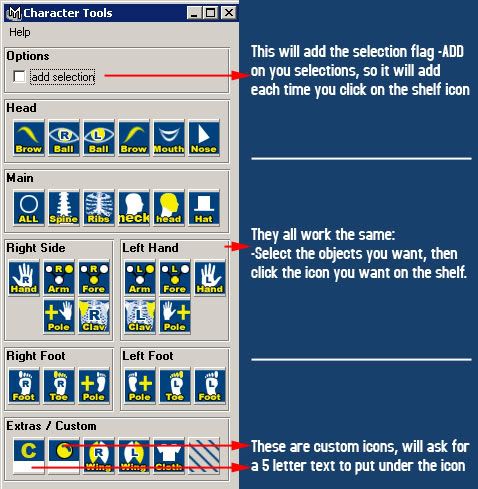

Not really my favorite, because the window took so much space and it look unorganize and not flexible. But perhaps if you like it, you may give it a try.

*edit: Receive a comment from Dan himself, perhaps I should spend more time on this script before posting it. Thanks Dan for your comment!

23 June 2007

Extremely Busy & Habu


Again, I'm not dead. Just been extremely busy these few weeks. Looking back at my post here which was last year's entry, I finally get a Habu mouse. Some of you may say I'm insane, in fact, all the people in my office said so. It cost me RM250 (Rp.650.000). I believe I was physically and mentally healthy upon the transaction. Well, for a mouse that you use regularly everyday, is it too harsh to invest a little bit more on it? Besides I've been using my old white mouse(which was my favorite) till I got wrist injured :)

I'll be writing on how to create a UI for character animation selection. Not really my preference, but since I'm out of idea and BuGuru requested it, might give it a try.

05 June 2007

Maya 8.5 Service Pack 1

Previously in maya 8.5, batch rendering with render layer cause a loop. No more confusion now.

You can get the service pack update here

31 May 2007

Cylman_WIP_04

Finish with the character.
Now the most exciting part : unwrap~


30 May 2007

Cylman Test Render

Just a simple test render done in Modo. Starting to get busy with office work but I can't wait to get this thing done.

22 May 2007

Cylman_WIP_03

Too much work, too little time. I decided to cut down the BG scene, focusing on character.

However, I've done the background, except the big main object there. For now I'll proceed with unwrap and texturing.

21 May 2007

WorkRave


Workrave is a program that assists in the recovery and prevention of Repetitive Strain Injury (RSI). The program frequently alerts you to take micro-pauses, rest breaks and restricts you to your daily limit.

Well for most of us, animators, designers who spend more than 8hrs a day in front of computer, I guess this is a good program for exercise hehe..

Just click the Title to go to the download page.

19 May 2007

Toggle WireFrame <-> Shaded

A little script to save time. By default '4' is to display wireframe. '5' is to display Shaded mode. This script can toggle both.

I assign to '5'

//Toggle Wireframe <-> Shaded
$currentPanel = `getPanel -withFocus`;
if ( `modelEditor -q -displayAppearance $currentPanel` == "wireframe")
modelEditor -e -da smoothShaded -displayTextures off -displayLights "default" $currentPanel;
else
modelEditor -e -da wireframe $currentPanel;

18 May 2007

ReVisit old website

Looking back 2 1/2 years ago on my website here

It was done in half days, rushing to get job in game industry during that time. Ended up never updated.

I laugh to see my old works, it sucks.

Maybe I'll laugh again to see my current work in the next 2 years.

16 May 2007

Adobe Photoshop CS3 tryout

Just tested PS3 last nite. Overall I like it, especially the 3d integration. Still got a lot more to explore, but for now I would like to share this simple tips.

Back in old time it's quite troublesome to have a 3d object viewed with the wireframe.

In CS3, just import the obj file, and double click on the 3d layer, and chech the setting on the image.

There seems to be a lot of potential for enhancing workflow in the pipeline. The new Edit a video on a frame-by-frame basis could be really helpful in removing green matte for examples. Lots of stuffs, lots of fun..

Sadly, It doesn't run on Windows 2000...