1) David Keegan C3[download]

This is by far the simplest and step by step guide.
1) By executing the script you're prompted with a dialog to setup or load character.
2) If you choose setup, the first step is to define the character(type the name), what it does is to snap a screenshot based on the camera(It is actually playblasting currentframe and save it as images)
3) Once you click done, the next step is to define the control, you can select and move it in x and y direction, the select field works this way:
- select the control on C3 viewport, select any object/control in maya viewport.
- press the 'select' button. C3 will link both object.
- Under the tool, you can either select one, so by selecting the control, it automatically change to the tool corresponding to the tool you select.
refer to the image for better understanding.

click Finish and you're done.
But as you can see, there's no additional node in the scene. C3 is quite smart in the way it stores a mel inside your project directory, you can see a folder named "C3" and inside there is a snapshot and a mel file. So you can always load the character anytime.
2) Adam Burke's abxPicker.

abxPicker is similar to C3, but with more control and advanced settings.
Everything is basically already explained in the help.


3) Dan Moreno's Character control
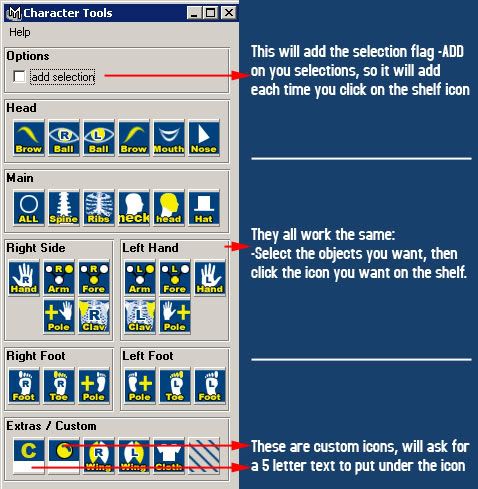
Not really my favorite, because the window took so much space and it look unorganize and not flexible. But perhaps if you like it, you may give it a try.
*edit: Receive a comment from Dan himself, perhaps I should spend more time on this script before posting it. Thanks Dan for your comment!