26 December 2007

Blog readibility

cash advance

Get a Cash Advance


No wonder this blog hasnt got much visitors :P

16 December 2007

My new side project

Hi all, since I'm not really into 3D anymore lately, doesn't mean I'm slacking all the way. All this while I've been doing a side project with a friend of mine. It's a blog about culinary and food in Medan, I welcome you to visit the blog here

Thank you.

29 October 2007

Slowly work my A** off..

Nothing much...


more update soon.. I mean.. 'soon'

04 October 2007

A tiny update

Not that I'm lazy, I'm relatively busy these days, though it's not CG related anymore... been helping my dad business, especially during fasting season (puasa), it's hell lots of customers, spare my time in gym, and sculpture (even though it's not started yet, preparing some homemade stuffs that couldn't be found here), and the fact that I'm still using a lousy home computer here...sigh.

I just got 301, so for now I'll stick with that since it's a lot lighter compare to maya in memory resource. Can't wait to start texturing on my cylinder character. Probably on Idul fitri, hey we got 1 week holiday rite? :)

Besides, I'm working on something with a partner, not a right time to announce yet.. :) soon..it will be..

09 September 2007

New phone

This morning went to plaza to buy a new phone, yes my old one is really old.. Just for the sake of camera, if not I won't change...


Nothing fancy, simple and elegant.. :D

07 September 2007

Body workout

Started to go to gym these few days, doing some workout after several years never did... Hell lotsa pain.. but no pain no gain... Ironic..

Started to register for a new school, but heck they're not convinced after 2 years I graduated, I need to compile my demoreel sigh..

Life's been good, I'm indeed not as relax as I can imagine, especially this week.. but it's all good and fun.

Still I miss Twisted, the people there.. some friends and definitely my girlfriend :D

02 September 2007

Medan I come

Finally i arrived Medan. First thing first, wii on widescreen! hehe..


More funs coming along. :)

FYI, anyone trying to contact me can reach me at +6281 9609 3837
My old number has expired due to fail of reloading on time ^^

27 August 2007

Pre Paradise

So... It's 1 week left before I'm going back to Medan. I've been jobless this month but luckily my savings is still more than enough to cover my expenses, at least till next year...hopefully. A lot of things happened but unfortunately I've just got internet installed after 3 weeks from 1st of August.. sucks..

Recent news is about the new version of maya and max. Funny they rename it to 2008 instead of Version 9. I personally didn't like the sound of that, but hey, it's autodesk.. they never listen to a customer like you. Overall improvement is worth to look at, especially on rigging and nCloth side. Modeling workflow is also increased by replacing 123 key to smooth.. very good workflow. But this time I'm more eagerly to wait for Modo 301. A lot of cool features that yet haven't been explored, and it will somehow slowly change our old school way of doing 3d.

Aside from 3D, Stanley my ex-colleague just celebrated his wedding few weeks ago. Lots of fun on the wedding dinner, especially toward the end, because AhLoong and Cjinq are both pawned and got drunk.. LOL. Congratulations Stanley, if you're reading this.

Since I'm no longer working, this blog will be slowly changing into personal blog. I'm taking a break and going back to learn traditional art, but I'll try to post any technical stuffs that I find interesting to be shared. :D

So, if you ask me what's my daily activities now? GAMING.. yeah..I'm so addicted to DOTA.. and eat. as much as I can before going back. I've just had Tony Roma's tonight, that made me want to post it..

First, it's the potato skin.. starter..


Then.. for me.. the uber-famous beef-rib..


as for my gf, she ordered chicken something lol..


In the end, we realized we ordered too much.. I'll probably skip my meal tomorrow...

07 August 2007

Wii...


I've been away from internet these few days.. just moved house.. so there's no internet and I'm so so outdated..

Good news is.. I bought wii.. at least it kept me staying out of boredom.. The internet should be ready within this week.. so till then..

I'm also preparing material to be sent to IndoCG showoff artbook..

31 July 2007

Farewell Twisted

My last day working in Twisted. 2 year time definitely leave so much good and bad memories. Time to move on however. Thanks to all my colleagues for being supportive.

I'll still be in KL until end of August. Enough time to settle my education stuffs and keep in touch with old friends.

27 July 2007

Farewell soon..Eat Eat Eat

Went to Klang to eat BakGutTeh last nite with colleagues.


More pictures on the dinner can be viewed on my collegues Loong's blog

Went to celebrate my farewell in Indonesian Restaurant in Sunway "Restoran Ria"

26 July 2007

New Hobby

Yesterday went to art shop to buy some basic traditional sculpting tools. It's expensive, so gotta be serious in this hobby.


No, it's not 'kue bakul'.. It's industrial styling clay :P I was thinking to buy super sculpey aswell, but my budget didn't allow and I'm afraid it'll cause overweight on my luggage when I go back Medan next month.


Did some housekeeping for this blog. The category is simplified and more organized now.

24 July 2007

Rectangular size texture map

Usually we will create square size texture map and for games engine, it'll mostly must be power of 2, e.g : 512x512,1024x1024,2048x2048. However there are particular case which require rectangular size, like 1024x512, or 512x128.

In maya itself, the uv range is always square, this is confusing because if we have a rectangular size texture slapped on square size layout, it will be stretched. Look at the image below.


The uv size range from 0 to 1. And it's square. Let's apply rectangular size texture.


The texture is now stretched. What if we want the uv to follow the texture rather than the other way round?
Use image ratio as shown in the image.


However, this result UV to stretch. Therefore, you need to work in the proper uv (image ratio on).
Once you're done with the uv, you can turn image ratio off. It'll look stretched (shrinked), but it doesn't matter, because that's the correct uv with correct texture. Unless you're planning to change the texture size :)

06 July 2007

2isted Website Updated


We just updated our website with some of our latest works. Please have a look and thanks for viewing.

*click the title to go to the website.

03 July 2007

Custom character control interfaces

As suggested by BuGuru, I would like to explain some of the custom character controls available. There's no point on creating your own unless the existing doesn't suit your workflow.

1) David Keegan C3[download]


This is by far the simplest and step by step guide.
1) By executing the script you're prompted with a dialog to setup or load character.
2) If you choose setup, the first step is to define the character(type the name), what it does is to snap a screenshot based on the camera(It is actually playblasting currentframe and save it as images)
3) Once you click done, the next step is to define the control, you can select and move it in x and y direction, the select field works this way:
- select the control on C3 viewport, select any object/control in maya viewport.
- press the 'select' button. C3 will link both object.
- Under the tool, you can either select one, so by selecting the control, it automatically change to the tool corresponding to the tool you select.
refer to the image for better understanding.


click Finish and you're done.
But as you can see, there's no additional node in the scene. C3 is quite smart in the way it stores a mel inside your project directory, you can see a folder named "C3" and inside there is a snapshot and a mel file. So you can always load the character anytime.

2) Adam Burke's abxPicker.


abxPicker is similar to C3, but with more control and advanced settings.
Everything is basically already explained in the help.


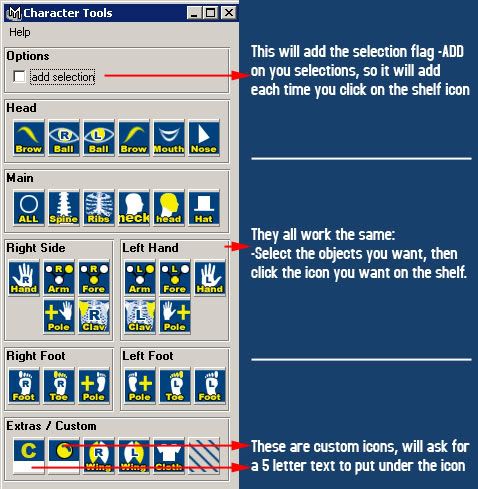
3) Dan Moreno's Character control


Not really my favorite, because the window took so much space and it look unorganize and not flexible. But perhaps if you like it, you may give it a try.

*edit: Receive a comment from Dan himself, perhaps I should spend more time on this script before posting it. Thanks Dan for your comment!

23 June 2007

Extremely Busy & Habu


Again, I'm not dead. Just been extremely busy these few weeks. Looking back at my post here which was last year's entry, I finally get a Habu mouse. Some of you may say I'm insane, in fact, all the people in my office said so. It cost me RM250 (Rp.650.000). I believe I was physically and mentally healthy upon the transaction. Well, for a mouse that you use regularly everyday, is it too harsh to invest a little bit more on it? Besides I've been using my old white mouse(which was my favorite) till I got wrist injured :)

I'll be writing on how to create a UI for character animation selection. Not really my preference, but since I'm out of idea and BuGuru requested it, might give it a try.

05 June 2007

Maya 8.5 Service Pack 1

Previously in maya 8.5, batch rendering with render layer cause a loop. No more confusion now.

You can get the service pack update here

31 May 2007

Cylman_WIP_04

Finish with the character.
Now the most exciting part : unwrap~


30 May 2007

Cylman Test Render

Just a simple test render done in Modo. Starting to get busy with office work but I can't wait to get this thing done.

22 May 2007

Cylman_WIP_03

Too much work, too little time. I decided to cut down the BG scene, focusing on character.

However, I've done the background, except the big main object there. For now I'll proceed with unwrap and texturing.

21 May 2007

WorkRave


Workrave is a program that assists in the recovery and prevention of Repetitive Strain Injury (RSI). The program frequently alerts you to take micro-pauses, rest breaks and restricts you to your daily limit.

Well for most of us, animators, designers who spend more than 8hrs a day in front of computer, I guess this is a good program for exercise hehe..

Just click the Title to go to the download page.

19 May 2007

Toggle WireFrame <-> Shaded

A little script to save time. By default '4' is to display wireframe. '5' is to display Shaded mode. This script can toggle both.

I assign to '5'

//Toggle Wireframe <-> Shaded
$currentPanel = `getPanel -withFocus`;
if ( `modelEditor -q -displayAppearance $currentPanel` == "wireframe")
modelEditor -e -da smoothShaded -displayTextures off -displayLights "default" $currentPanel;
else
modelEditor -e -da wireframe $currentPanel;

18 May 2007

ReVisit old website

Looking back 2 1/2 years ago on my website here

It was done in half days, rushing to get job in game industry during that time. Ended up never updated.

I laugh to see my old works, it sucks.

Maybe I'll laugh again to see my current work in the next 2 years.

16 May 2007

Adobe Photoshop CS3 tryout

Just tested PS3 last nite. Overall I like it, especially the 3d integration. Still got a lot more to explore, but for now I would like to share this simple tips.

Back in old time it's quite troublesome to have a 3d object viewed with the wireframe.

In CS3, just import the obj file, and double click on the 3d layer, and chech the setting on the image.

There seems to be a lot of potential for enhancing workflow in the pipeline. The new Edit a video on a frame-by-frame basis could be really helpful in removing green matte for examples. Lots of stuffs, lots of fun..

Sadly, It doesn't run on Windows 2000...

15 May 2007

Loo Chean Khiang demoreel 2007

One of my senior has just completed his website, with some demoreel. Worth a look :)

http://khiang.co.nr

Maya modeling technique

Before using maya, I was a lightwave user for about 2 years. Having accustomed to modeling toolset in LW, I cursed maya a lot when I just started to use it.

However, I found some similar technique which can be found in Max or XSI too perhaps.

Based on my knowledge and experience, these 3 are the technique I used the most.

1. Using proxy.
I used this the most. Previously maya below version 7 hasn't got this tool yet. Instead I used CPS (Connect Poly Shape). It's a script, which behave in similar way.

To use:
- select an object you want.
- click Proxy > Subdiv Proxy options box.
For more info, you can refer to help. But usually I would leave everything to default, except Subdiv Proxy Shader to Keep.


Once applied, you'll see there's a new object on top of it. If you check the outliner, There are now 2 objects under 1 group.


So how's it similar to LW? Did you see TOGGLE PROXY DISPLAY and BOTH PROXY AND SUBDIV DISPLAY on previous image? There's a default shortcut key, which is ` and ~.

Try this:
Select vertex on lowpoly, press `, move it, so now you'll see the hires is moving as well.

Okay, now I'm done with the modeling, how do I clean it up?
Well, you can manually delete the hires, unparent the lowpoly and delete the group node, but the simpler way would be:
select the lowpoly object, apply the proxy > subdiv proxy again.

Why manually delete? Sometimes I found proxy to be a little bit buggy.

Advantages:
- Easy toggle and editable. LW and Modo users will love this.
- History is properly kept.

Disadvantages:
- Sometimes buggy with mirrored objects.
- Sometimes you have to manually delete the smooth object (bug I guess)
- Smoothed object might have problem with render (investigate the render stats under attribute editor)


2. Active Smooth Poly (http://www.3dbe.com/ActiveSmoothPoly/Default.aspx)
This is another script I used by Tal Threstha. The purpose I used this mainly is for viewing hires object only.
You'll find out more in his website, I'll just summarize.

Advantages:
- Fast, I assign to alt+q, object smoothed, and you can still orbit the viewport
- Good for minor tweaking which do not require proxy.
- History is clean, since the script will automatically clean polysmooth node after it's deactivated.
- Comes with smoothing radius, so you can adjust the distance of smooth, good for slow computer.

Disadvantages:
- Once smoothed, you can't edit the lowres object like proxy mode.
- selecting object and activate the script is fast, but selecting vertex and activate the script seems to slow down performance.


3. HKSubDConvertor (http://www.henrykorol.com/Scripts/SubdToggle/index.html)
The last one here is not really my preferences, but it's worth mentioning. I occasionally use it.
Again, visit the website for more information.

Advantages:
- Smooth object look really smooth, because it converts object to SubD
- Good for detailing or finishing phase.

Disadvantages:
- Always delete history, not good if you'd like to keep bevel or such node.
- Personally I just feel it's not clean, even though it claims to be.
- Once in a while it would crash maya.
- Conversion would be slow sometimes, depending on your machine and poly counts.

hello..are u still awake? :P

27 April 2007

Insert Edge loop tool tips.

Just in case most of you don't know, here's a little gem on insert edge loop tool, which I've neglected for a while, but now I use this tool a lot.


You can also check out the offset edge loop tool...

25 April 2007

File Revision System using FileHamster

When working with scenes, we are aware that saving files incremently is extremely important. However, most of the times we end up losing the track/record of what we have done toward that particular scene and we often end up being cluttered by bunch of files inside a folder.

There are several ways to remedy this, one of them is by using attribute editor (there's a small comment box in the bottom)


I recently found a free software called FileHamster. What it does is basically save the backup of your current scene, and allow you to give comments, or notes, and also lock the file, so that it's not easily edited.


What you see here, is that I ask FileHamster(FH) to watch a folder called c:\Documents...\scenes, and in that folder I have only 1 file, which is test_V01.mb

test_V01.mb only have a sphere in a scene. I save the file.
The popup will appear, asking what comment you wanna write, so I write "a scene..."

Next, I add a cube to the scene, and save again. This time I still save the scene as test_V01.mb, instead of test_V02.mb, which was my typical workflow. The popup appear again, asking for comment, so I add "tambah cube".

I did the same thing again by adding cone.. and the process goes on.

The benefit here is that I only have a file on my working directory, instead of several versions, which is of course, neato!

There is a good example on using FH with Photoshop in their website, I suggest.. give it a try :)

Foto Jadul

I found this photo when organizing my Harddisk folders. Funny when I looked back into my past, things have changed ever since, I miss those time painting on canvas, or spent one week mid-term break at library practising anatomy and sketches everyday rather than going on holiday or break like others did. It's sad to think about it, as I didn't have as much fun as others did, but I won't be what I am now if I took the other path :)

The other guy on the photo is Foad, my life drawing lecturer on sem 2. Totally a pure artist, he played music, weird music... he does caricature, and lotsa other stuffs.. Genious guy I would say.. one of my best teacher and a guy who influence my life, well.. at least the hair is a good starting point :P

23 April 2007

10th ICG Speed Modeling Session - Glasses

This is my entry, It's totally done in Modo. I won't call it speed modeling, the whole thing take me a day to finish off. Well, the most important thing is that I learnt :) and I'm still adjusting myself to get used to modo. Modo tools are awesome... Hope I got more time to explore.. gotta continue my cylman for now :D

21 April 2007

CylinderMan WIP: character done

Small update, The character is considered done, though not 100% resemblance. The detail on the bust and abs would be done via normal map.

It's time to continue with the environment now.

cylman_wip_03

19 April 2007

Cylinder Man Work in Progress

Something I've been working on, on&off...

The concept art image was taken from Puyuh

illus007

Work in Progress:
char_01

cylman_wip_02_forweb

15 April 2007

Jakarta Undercover the movie

I met Lance a while ago on Indosat job, which require me and KFC to fly down to jakarta to handle and supervise some CG shots. I was told about this film while chating with him during break session, but never been given a clue about the movie. It was supposed to be shown last year, and some of us were invited to the premiere.. but I think as time fly, it's forgotten :P or maybe it could be another reason, as the title said, it's quite controversial. I read the novel, it's thrilling and creative in unique way. Let's see how well Lance portray it into the screen :)

Here's some information about the movie, taken from here


Velvet Films

The Most Anticipated Indonesian Movie of 2006

JAKARTA UNDERCOVER
Director : Lance (Cinta Silver)
Cast : Luna Maya (Bangsal 13, Cinta Silver, Ruang)
Lukman Sardi (Pesan dari Surga, Berbagi
Suami, Gie)
Fachri Albar (Alexandria)
Christian Sugiono (Catatan Akhir Sekolah,
Cinta Silver, Jomblo)
Laura Antoinetta
Aimee Juliet
Introducing : Kenshiro Arashi
Cameo : Fauzi Baadilla, Mario Lawalata, Hanung
Bramantyo, Sita Nursanti, Farhan, Ray Sahetapy, Tutie
Kirana, Arswendi Nasution

Beredar serentak di seluruh Indonesia

Mulai 22 Maret 2007

09 April 2007

Setting Image Plane in Maya

There are 2 most popular techniques used to setup imageplane for modeling reference. Let's discuss both of them.

Before we begin, let's get some image to model. In Photoshop, align them.
So here it is:


Use marquee tool to select each image, crop, and then save them separately. So, now we have:
car_side.jpg
car_top.jpg
car_front.jpg

Notice that the car_front is facing right, we need to rotate it 90* to the left, so it's facing down (which is +Z in Maya)

Back in maya, here is the first technique:

01. Using camera image plane.
advantage: Easy, less hassle.
disadvantage: Slow down maya performance.
How? Watch this video :)


02. Using poly plane.
advantage: Faster maya performance, easy adjustment.
disadvantage: Slow setup.
How? Watch this video :)


From both technique, I prefer to use the second one, which use polyPlane. I know it takes a while to setup, but hey.. There's a script to simplify your workflow.

Watch this video to understand better :)

08 April 2007

Blog Template Update

So.. yeah, in the lazy sunday afternoon.. nothing to do..
Redesign the layout, seharusnya lebih rapi dan readable, and the comment is hopefully working now.

Hate to do this, but it's fun once in a while to bimbo blog.
Lagi finishing animator friendly rigging part 01 by Jason Schleifer (characterTD - gollum@WetaDigital) and I'm concentrating on utilizing modeling and rendering workflow in MODO. It's a great app, small, but potential.

Let's hope I can come out with something in these few weeks using that software :)

I'll start blogging in english now. Since visitors' number are increasing, I'm confuse to either continue blogging in Indonesian or english. Some complained reading what I wrote. Clarity is necessary, and honestly I'm not so fluent writing indonesian, so to be universal, I guess it's fair.

06 April 2007

Big Babol Chameleon

Here's a still of the project we've just done recently.

Maya, Mental Ray.

Modeling and texturing : me
Animation : Yuen and me
Lighting, Shading : Khiang.
Flame : Mathieu.


Breakdown :