26 November 2006

query a directory name

How can I build a file browser dialog, to select a file that doesn't yet exist? Or to select a directory only?
  • fileBrowserDialog
  • Notes: The docs on this suck, so this is what you need to do:
  • Example:
    • First, built the file brower dialog: -mode is telling it what to do:
      • fileBrowserDialog -mode 2 -fileCommand "procName" -actionName "whatYouAreDoing";
        • -mode 0 is for reading files, so if you type in a name that dosn't exist, the browers will give an error
        • -mode 1 & 2 are pretty much the same and are for for writing to file, so you can speficy your own filename inthe browers.
        • -mode 4 is for selecting directories only.
        • -fileCommand is the name of the below proc, that the fileBrowserDialog? passes its info to.
        • -actionName is simply what is printed in the UI, telling the user what is going on
    • Next, you need to build a proc, that can take the return from the FBD, and then do something with it. It needs to be in the below format, but the proc name, and var names can change.
      • global proc procName(string $result, string $type){
        textFieldButtonGrp -e -tx $result controlName;}
    • So, the fileBrowserDialog passes its info, via the $result argument, into the "procName" proc. Then procName will update controlName with $result.

  • Another issue: By default you can't specify WHERE the dialog will open too. It appears that it bases where it opens on where Maya's current workspace is. SO, to tell it where to go, you'd need to do something like this:
    • // query Maya's current workspace:
      string $mayaWorkspace = `workspace -q -dir`;
      // set the workspace to where you want the dialog to open:
      workspace -dir $myCustomPath;
      // run the dialog code:
      fileBrowserDialog ....
      // and set the workspace back again:
      workspace -dir $mayaWorkspace
  • Annoying!
I find this article to be extremely useful, so I'll get it pasted. The original article is in here

16 November 2006

2isted Maya File Manager


Based on soBrowser by Safak Oner. Modified to suit office pipeline. Added, modified, remove, and enhance some features. Also fixing some problems regarding compatibility with windows2000 and Maya6.

The script is also a way to learn MEL. I now realize MEL is powerful!

yet complicated... ^^

Project ini cuman buat latihan scripting. I hope one day I can create my own script :)

09 November 2006

Finally an update :)


Super sibuk belakangan.. Lebih banyak ngurusin pipeline kantor. Barusan kelar ngeset renderfarm. Well.. setelah beberapa trial dan attempt, kita decide make Muster 4.5. Sebelumnya ngetes drQueue tapi terlalu complicated dan lebih linux based, ngetes NDRserver, ini simple banget. Ga ada instalasi, dan ga ada setup network segala, dan berjalan dengan baek. Kita ga pakai karena ga ada support buat mental ray for maya. Custom string bisa dilakukan (dengan memasukkan "render -r mr ...", namun hanya berfungsi pada 1 komputer. Enfuzion keliatan terlalu rumit dan memerlukan sebuah dedicated server, maka kita batalkan. Royal render keliatan bagus, namun lebih ke linux based. RenderPal seems to be sooo good.. Tapi karena sebelumnya kita udah nginstall muster (tapi versi jadul) maka portnya clash. Akhirnya setelah ngetes beberapa candidates, we decided to enchance Muster performance.

Buat yg biasa render big size buat print, ada satu tool yg bagus dari renderpal, namanya renderpal 2004 workstation. Fungsinya bisa jadi render batch manager, jadi di maya ga usah lagi manual ngetik command .bat . Bisa juga automate imageslicing (dan support mental ray for maya). But sadly, tidak ada network render support, but hey... it's FREE :)

Hehe...wait for another exciting upcoming script. Gw enjoy banget modifying/developing script ini buat internal use di kantor doank. Walau hanya modifikasi dari script orang, setidaknya saya mengalami banyak proses belajar dalam hal scripting :)

22 October 2006

CCleaner

CCleaner is a freeware system optimization and privacy tool. It removes unused files from your system - allowing Windows to run faster and freeing up valuable hard disk space. It also cleans traces of your online activities such as your Internet history. But the best part is that it's fast (normally taking less than a second to run) and contains NO Spyware or Adware! :)

CCleaner - Freeware Windows Optimization

Gw udah nyoba tools ini dan memang terbukti membersihkan file2 registry, cookies, temp files, dan laen sebagainya. I recommend download this tool, sizenya ga gede. Banyak software alternatif seperti ini, namun kebanyakannya berupa commercial.

17 October 2006

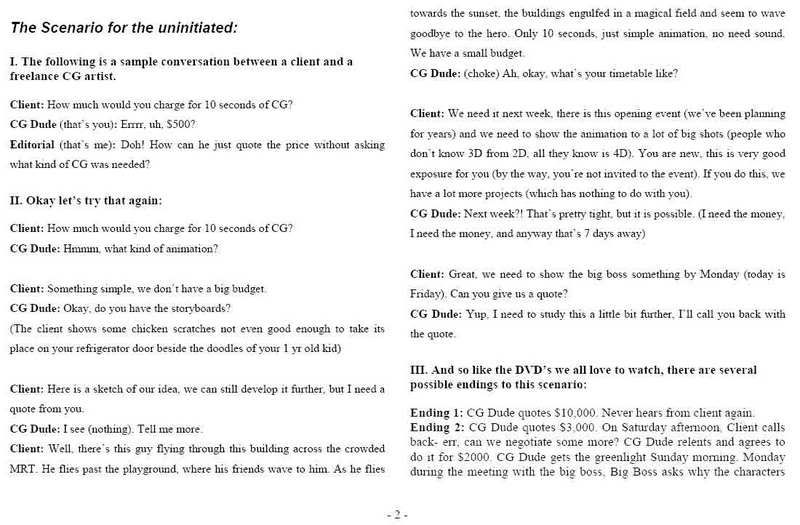
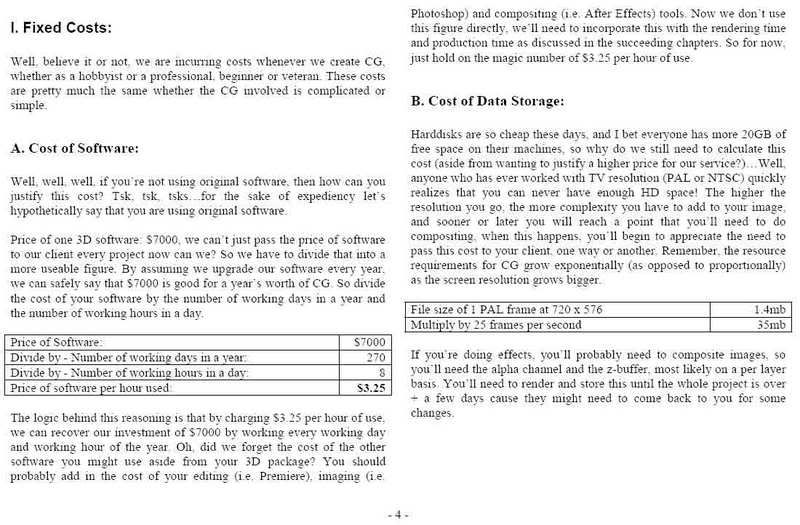
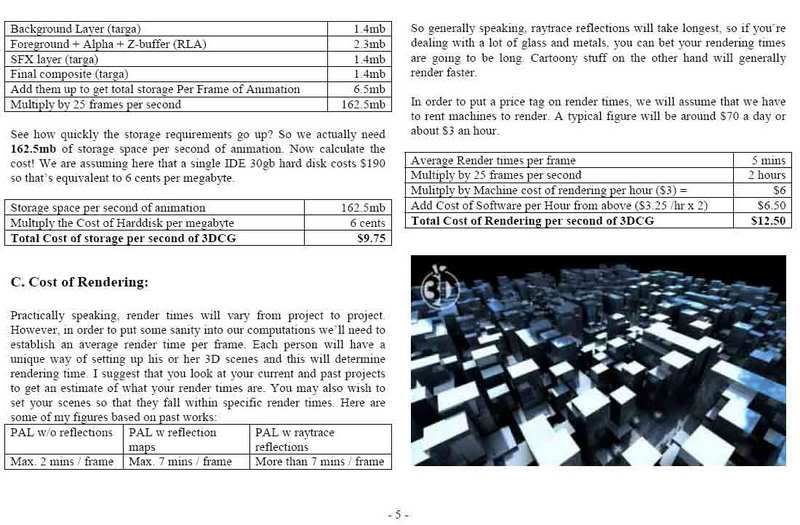
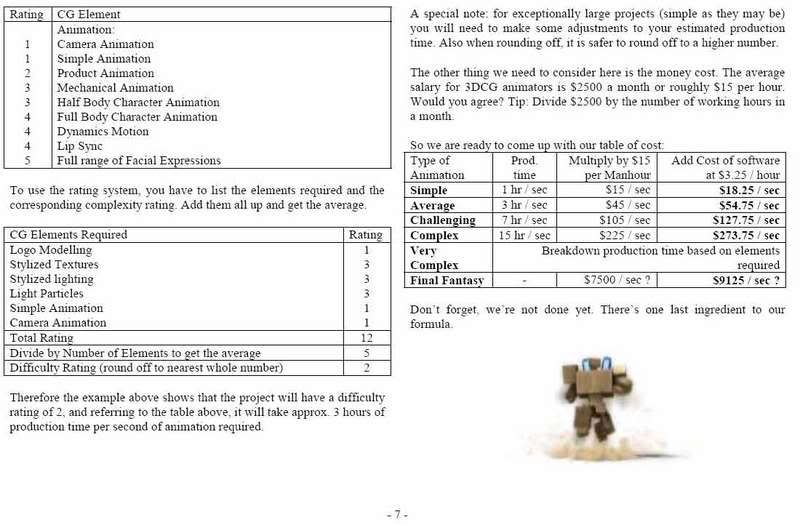
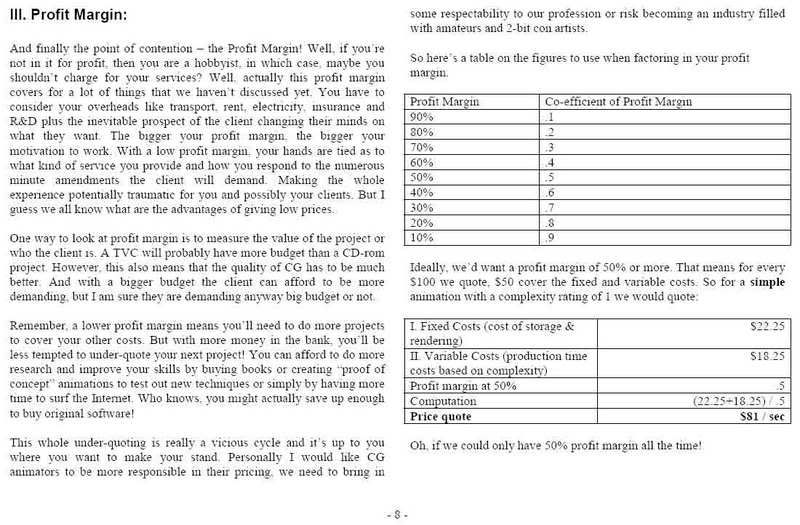
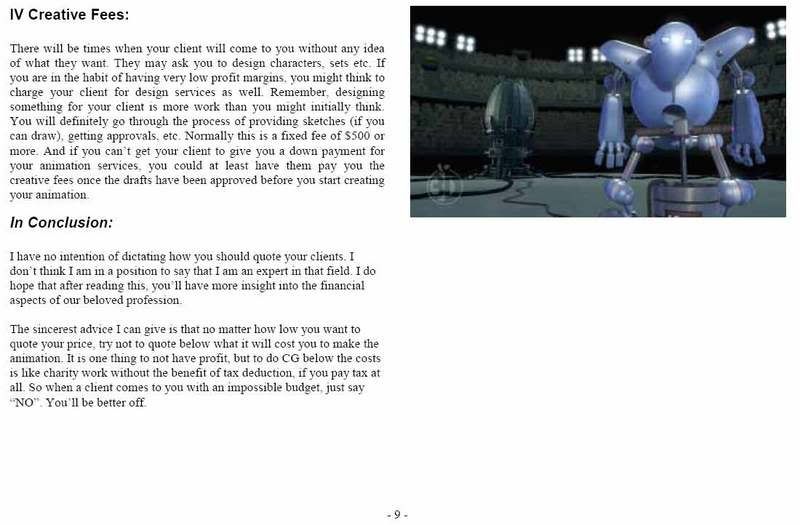
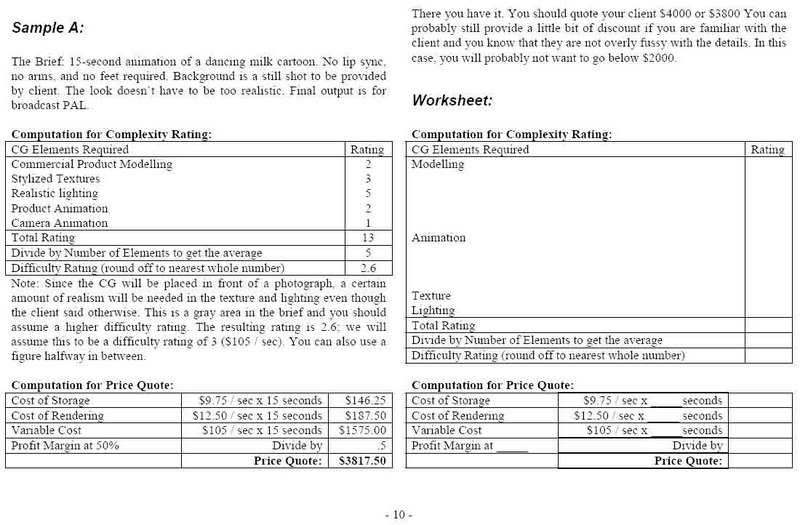
Freelance guide to Pricing

Gambar berikut di bawah ini saya dapat dari teman saya, walau udah lama ditulis, tapi masi bisa dijadikan sebagai panduan umum.. dan bukan hanya terbatas pada dunia CG saja. Bisa saja diterapkan ke web design, graphic, interior, dan laen sebagainya. Hanya dibutuhkan beberapa penyesuaian :)

Silahkan klik pada gambar utk memperbesar. (mind the low compression images to allow faster loading time)


13 October 2006

Organizing Mental Ray Shaders

Mental Ray for Maya secara default diinstall di folder Program Files. Berikut alasan kenapa kita menggunakan custom location path agar maya meload mental ray shader di lokasi yg kita tentukan:

- Pada lingkungan kerja seperti saya, komputer diberikan restriksi agar tidak dapat meng-akses folder program files.
- Menjaga agar folder Maya 'bersih'.
- Custom path dapat ditaroh di sebuah server, dan dapat dilink dari beberapa workstation, sehingga shaders tidak perlu diinstall pada tiap2 machine, terutama apabila ada update.. kan repot..

Berikut langkahnya:
- buat folder di my documents\mayax.x\ dengan nama mentalRay
- dalam folder mentalRay, buat 2 folder dengan nama include dan lib
-
Copy maya.rayrc dari folder program files ke folder mentalray
- edit maya.rayrc dengan menggunakan notepad. Contoh :

#**********************************
# Copyright 1986-2003 by mental images GmbH & Co.KG, Fasanenstr. 81, D-10623
# Berlin, Germany. All rights reserved.
#**********************************
# Evaluated at startup time of the plug-in to fill the mental ray registry.
#**********************************/

registry "{MAYABASE}" value "C:/Program Files/Alias/Maya6.0/mentalray" end registry

registry "{SYSTEM}" value "windows" end registry
registry "{DSO}" value "dll" end registry

$lookup "{MAYABASE}"
$lookup "{SYSTEM}"
$lookup "{DSO}"

registry "{MRMAYA_START}"
link "{MAYABASE}/lib/base.{DSO}"
link "{MAYABASE}/lib/physics.{DSO}"
link "{MAYABASE}/lib/mayabase.{DSO}"
link "{MAYABASE}/lib/contour.{DSO}"
link "{MAYABASE}/lib/subsurface.{DSO}"

mi "{MAYABASE}/include/mayabase.mi"
mi "{MAYABASE}/include/base.mi"
mi "{MAYABASE}/include/physics.mi"
mi "{MAYABASE}/include/contour.mi"
mi "{MAYABASE}/include/subsurface.mi"
echo "mental ray for Maya - startup done"
end registry

$lookup "{MRMAYA_START}"

#********** CUSTOM SHADER SECTION **********#
# taroh custom shader di bawah ini, sesuai dengan nama shader di folder mentalRay

registry "{MYBASE}" value "{$HOMEDRIVE}/{$HOMEPATH}/My Documents/maya/mentalray" end registry

$lookup "{MYBASE}"

registry "{MY_START}"
link "{MYBASE}/lib/ReflectionUtility.{DSO}"
mi "{MYBASE}/include/myPhenomena.mi"
mi "{MYBASE}/include/usefulPhen.mi"
mi "{MYBASE}/include/ReflectionUtility.mi"
end registry

$lookup "{MY_START}"


- Sejauh ini MentalRay hanya di load sewaktu kita melakukan proses rendering. Agar MentalRay dapat diload saat Maya startup, kita harus menentukan path custom shader, dimana bisa dilakukan di Maya.env yg terletak di My Documents\maya\6.0
- buka dan edit, tambahkan command ini :

MI_CUSTOM_SHADER_PATH=%USERPROFILE%\My Documents\maya\mentalray\include

That's it for basic stuff.

Going further...

Kadang Shaders MentalRay datang bersama AETemplate dan icons. Taro AETemplate di maya6.0/scripts/AETemplates folder(buat kalo belum ada) dan icons ke maya6.0/pref/icons folder.
Kemudian pada Maya.env, tambahkan command ini:

MAYA_SCRIPT_PATH=%USERPROFILE%\My Documents\maya\scripts\AETemplates

12 October 2006

Binary Alchemy Mental Ray shaders pack

Karena lagi nunggu render, saya coba browsing2 website yg berhubungan dengan xsi. Bukan karena software, melainkan Mental ray-nya :P Good news is, saya ketemu website yg bagus. Ga tau gw yg kolot ato apa, tapi yg pasti ini perlu dipelajari dan diterapkan dalam produksi.

Belakangan ini saya masi mempelajari shaders dari Fransescaluce (Ctrl Studio). Beberapa diantaranya ialah ctrl.buffer dan ctrl.occlusion yg terpenting.

Informasi ttg shaders dan downloadnya bisa didapati di :

http://tokeru.com/twiki/bin/view/Main/MentalRayShader

Beberapa plugin/shaders Mental ray dapat didownload di website ini :

http://www.binaryalchemy.de

Worth a try, terutama LightDome, karena algoritma penggunaan lightnya beda dengan IBL yg lumayan banyak dan lama, dimana bisa dioptimize dan mempercepat waktu render.

10 October 2006

MaxYa

phew sibuk dengan project belakangan ini. Dan juga mental ray 3.5 :)
Ada sedikit update ttg tools dari Kursat, namanya MaxYa .. hehe kedengarannya lucu. Walau masi under development, kayanya ini tools bakal nge-gantiin Mel Studio Pro. Dari screenshot gw liat bakalan lebih comfortable buat edit mel script dan juga workflownya. Bagusnya lagi.. FREE.. Can't wait for it's release :)

ini linknya : http://www.ddmel.com//index.php?categoryid=24

01 October 2006

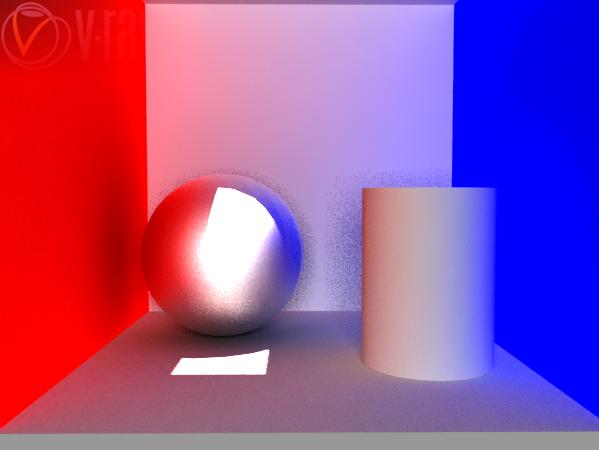
Vray for Maya render test

Walau masi dalam tahap beta dan belum sepenuhnya compatible dengan maya, renderer yg semakin populer di kalangan Max user ini nampaknya memiliki potensi yg baek sebagai renderer choice saya. Easy to use, outstanding result.

Ini screenshot dari test saya dengan menggunakan cornell box. Render dengan menggunakan GI. Kedua gambar dirender dalam waktu kurang dari 3 menit. Size gambar cuman dibatasi segitu, dan diberi watermark (karena emang public beta release).

to do list selanjutnya, mental ray 3.5 dan maya 8.0 :)


30 September 2006

Cgtalk Lighting challenge #06 entry

Lagi pas free di kantor, 2 minggu belajar maxwell, scene pake Lighting challenge di cgtalk. Model dibuat oleh Jeremy Birn.

Technical spec :
-Render time : 34 jam
-Sampling level : 20
-api lilin dan asap dupa pake photoshop comp