semalam sekitar pukul 10-an, blogger ku mati tanpa alasan, sempet bingung dan khawatir juga contents gw ilang semua, akhirnya lega waktu gw buka balek di pagi ini.
Waktu surfing pagi ini, ada beberapa site menarik yg mengandung local content.
www.tvconair.com
- website yg menyiarkan TV commercial yg pernah beredar di indo.
http://media-ide.bajingloncat.com/
- interesting blog yg menyediakan artikel ttg konten2 di indonesia.
07 March 2006
06 March 2006
03 March 2006
Change Design
Bosen nunggu hasil renderan yg lumayan lama, saya rasa ada bagusnya juga utk mendesign ulang header image di blog ini, karena saya takut juga kalo terus make identity kantor ntar kena masalah ama copyright ato apa lha..
Minggu ini udah aga lega..setidaknya sampe saat ini beban kerjaan gw udah mulai berkurang satu demi satu. Syukur besok bisa pergi ke pernikahan James.
Congratulations, James! u ain't bachelor anymore dude.
Visa gw expires tgl 12 bulan ini. Kayanya musti balek Medan lagi...
Minggu ini udah aga lega..setidaknya sampe saat ini beban kerjaan gw udah mulai berkurang satu demi satu. Syukur besok bisa pergi ke pernikahan James.
Congratulations, James! u ain't bachelor anymore dude.
Visa gw expires tgl 12 bulan ini. Kayanya musti balek Medan lagi...
01 March 2006

28 February 2006
Ubuntu Linux
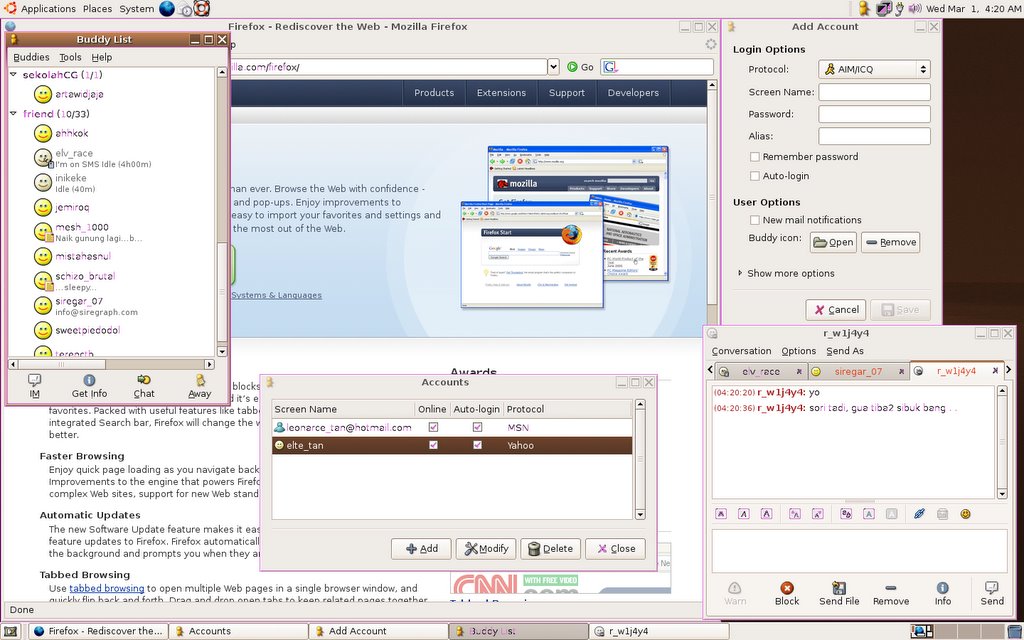
Setelah beberapa masalah yg menyebalkan dalam OSx86, akhirnya laptop saya tampil dengan OS yg baru :P, UBUNTU linux. CD gratis yg dikasi Thomas emang Menakjubkan! Instalasinya lebih gampang dari window! ga macam2 deh...ga ada settingan rumit..*kecuali kalo emang maen network..
Walaupun resolusi laptop saya hanya 1440x900 dgn refresh rate 60hz, tingkat refresh dalam desktop linux saya cepet banget responsnya.
Stabil! ga ada masalah selama pemakaian Ubuntu, kebetulan di kantor, server kita juga make, jadinya gw secara langsung mendapatkan support dan troubleshooting dari Thomas.
Walau saya agak Gaptek, rasanya ubuntu mempunyai potensi yg baek di masa mendatang. Apa yg saya butuhkan sudah ada disini, OpenOffice, GAiM, FireFox, GIMP, imageViewer.
Nah..gimana kelanjutannya? kalo ada waktu saya akan coba bermaen dengan program2 berat seperti maya.. :) kita liat bagaimana performancenya.
Ini screenshot Ubuntu dalam laptop saya:

ps. I'M STILL WAITING FOR MY OSx86 ON MY LAPTOP. masi nunggu release yg lebih stabil.
Walaupun resolusi laptop saya hanya 1440x900 dgn refresh rate 60hz, tingkat refresh dalam desktop linux saya cepet banget responsnya.
Stabil! ga ada masalah selama pemakaian Ubuntu, kebetulan di kantor, server kita juga make, jadinya gw secara langsung mendapatkan support dan troubleshooting dari Thomas.
Walau saya agak Gaptek, rasanya ubuntu mempunyai potensi yg baek di masa mendatang. Apa yg saya butuhkan sudah ada disini, OpenOffice, GAiM, FireFox, GIMP, imageViewer.
Nah..gimana kelanjutannya? kalo ada waktu saya akan coba bermaen dengan program2 berat seperti maya.. :) kita liat bagaimana performancenya.
Ini screenshot Ubuntu dalam laptop saya:
ps. I'M STILL WAITING FOR MY OSx86 ON MY LAPTOP. masi nunggu release yg lebih stabil.
23 February 2006
Mac on my laptop
Akhirnya mimpi gw terkabul! gw berhasil mengubah laptop yg berbasiskan intel menjadi mac tiger 10.4.3 . Walaupun bingung juga awalnya, tetapi berkat KFC dan sedikit kesabaran akhirnya sistem OSx86 berjalan juga di laptop gw. *padahal udah mau nginstall linux :P
Beberapa hal yg masi perlu diperbaiki:
-Network dan Wifi.
-OpenGL masi sedikit bug ( gw coba silo di mac rada aneh)
-Resolusi monitor ( cuman ngedukung 1024 x 768), laptop gw widescreen 17", seharusnya bisa 1440x900.
-Tidak mendukung HyperThreading. ( Ini yg menjadi kendala utama kegagalan nginstall, karena osX selalu tiba2 meminta user utk me-restart komputer), masalah besar bagi users laennya juga, karena terdapat beberapa hal yg sampai sekarang belum ditemukan penyebab utamanya, ada yg bilang masalahnya pada dvd-rom yg udah tua, ato pas burn dvd nya terlalu kenceng, tetapi sewaktu dvd-osX di burn di laptop KFC, 64bitXP, AMD dengan kecepatan burn 24x tidak terdapat masalah.
Ah senangnya.......bayangkan aja pc gw yg harganya 14 juta dibanding ama mac powerbook 17"..
next thing:
-nyoba benchmark 'mac' gw dengan mac nya produser gw yg pake powerbook 15"
-software dan hardware compatibility troubleshoot.
Ini screenshotnya (diambil pake HP):


update: masi banyak yg perlu diperbaharui lagi, major problemnya belum ditemukan, sering nge-hang.
*banyak yg complain ga bisa buka gambar di blog, hm...musti switching ke flickr kayanya..
Beberapa hal yg masi perlu diperbaiki:
-Network dan Wifi.
-OpenGL masi sedikit bug ( gw coba silo di mac rada aneh)
-Resolusi monitor ( cuman ngedukung 1024 x 768), laptop gw widescreen 17", seharusnya bisa 1440x900.
-Tidak mendukung HyperThreading. ( Ini yg menjadi kendala utama kegagalan nginstall, karena osX selalu tiba2 meminta user utk me-restart komputer), masalah besar bagi users laennya juga, karena terdapat beberapa hal yg sampai sekarang belum ditemukan penyebab utamanya, ada yg bilang masalahnya pada dvd-rom yg udah tua, ato pas burn dvd nya terlalu kenceng, tetapi sewaktu dvd-osX di burn di laptop KFC, 64bitXP, AMD dengan kecepatan burn 24x tidak terdapat masalah.
Ah senangnya.......bayangkan aja pc gw yg harganya 14 juta dibanding ama mac powerbook 17"..
next thing:
-nyoba benchmark 'mac' gw dengan mac nya produser gw yg pake powerbook 15"
-software dan hardware compatibility troubleshoot.
Ini screenshotnya (diambil pake HP):


update: masi banyak yg perlu diperbaharui lagi, major problemnya belum ditemukan, sering nge-hang.
*banyak yg complain ga bisa buka gambar di blog, hm...musti switching ke flickr kayanya..
Add In BlendShape Target
Add In BlendShape target
Problem: having cartoony eyes, but it's not round, rather, it's squashed. Creating a wink or blink is such a pain.
Solution:
1. Model eyes in Lattice
2. model eyes in Half blink to support the blendshape 'add-in'.
Concept: "blending" the blendshape so that when the eyes blink, so it doesn't intersect with the eyes.
Steps:
1. Model a sphere, apply lattice deformer, any amount of S,T, U doesn't matter, but used it wisely, least is better. shape it to any stylish cartoony eyes you want.
2. model the head, the eyelids according to the shape of the eyes.
3. create a blendshape, let's say it's blink, duplicate the base head, and model the half blink.
4. So now we have the base head, the half blink head, and the full blink head.
5. Select the half-blink eyes, the full blink eyes and then the base head in order, then goto deform> create blendshape> option box.
6. under the target shape options, check the In-Between.
7. There you go, when you slide to 0.5, it will use half blink, because you only have 2 model to blend.
8. depending on your blendshape model, just divide 1 with the amount of blendshape you have.
Say, the client(again!) want to add 1/4 blink(they might!) into your finished model, creating the blendshape from scracth again would pain in the ass, so this is what we can do:
1. assuming we have full head, 1/2 blink head and full blink head. select the 1/4 blink head(of course, after you model it).
2. go deform>edit blendshape> add >option box.
3. depending on how many blendshape you've got, you might have to check the Specify Node, but if you only have one, you don't have to.
4. check the "add in-between target".
5. Target index mean :
If the blend shape deformer blends target object shapes in parallel (the In-Between creation option was off when you created the blend shape deformer), you can add the new target object shapes so that they work in series with one of the existing target object shapes. One quick way you can identify the appropriate value for Target Index is by looking at the order of the target sliders in the Blend Shape Editor (Window > Animation Editors > Blend Shape). Note that in the editor, each target object shape has its own target slider. In the editor, going from left to right, the Target Index value for the left-most target slider would be 1, the next 2, and so on.
If the blend shape deformer blends target object shapes in series (the In-Between creation option was on when you created the blend shape deformer), Target Index can only be 1 because there is only one target slider. In this case, you don't have to specify Target Index, but you do need to specify the In-Between Weight.
6. depending on what line your half-blink head is in the blendshape editor window, just put that into your target index(put number, not the name of the blendshape), and set the weight to something less than 1, usually I put 0.5
That technique works fine with me, but there is another solution of using joints or cluster. I'll try to use that in the next project and compare to see which is more productive and efficient.
Problem: having cartoony eyes, but it's not round, rather, it's squashed. Creating a wink or blink is such a pain.
Solution:
1. Model eyes in Lattice
2. model eyes in Half blink to support the blendshape 'add-in'.
Concept: "blending" the blendshape so that when the eyes blink, so it doesn't intersect with the eyes.
Steps:
1. Model a sphere, apply lattice deformer, any amount of S,T, U doesn't matter, but used it wisely, least is better. shape it to any stylish cartoony eyes you want.
2. model the head, the eyelids according to the shape of the eyes.
3. create a blendshape, let's say it's blink, duplicate the base head, and model the half blink.
4. So now we have the base head, the half blink head, and the full blink head.
5. Select the half-blink eyes, the full blink eyes and then the base head in order, then goto deform> create blendshape> option box.
6. under the target shape options, check the In-Between.
7. There you go, when you slide to 0.5, it will use half blink, because you only have 2 model to blend.
8. depending on your blendshape model, just divide 1 with the amount of blendshape you have.
Say, the client(again!) want to add 1/4 blink(they might!) into your finished model, creating the blendshape from scracth again would pain in the ass, so this is what we can do:
1. assuming we have full head, 1/2 blink head and full blink head. select the 1/4 blink head(of course, after you model it).
2. go deform>edit blendshape> add >option box.
3. depending on how many blendshape you've got, you might have to check the Specify Node, but if you only have one, you don't have to.
4. check the "add in-between target".
5. Target index mean :
If the blend shape deformer blends target object shapes in parallel (the In-Between creation option was off when you created the blend shape deformer), you can add the new target object shapes so that they work in series with one of the existing target object shapes. One quick way you can identify the appropriate value for Target Index is by looking at the order of the target sliders in the Blend Shape Editor (Window > Animation Editors > Blend Shape). Note that in the editor, each target object shape has its own target slider. In the editor, going from left to right, the Target Index value for the left-most target slider would be 1, the next 2, and so on.
If the blend shape deformer blends target object shapes in series (the In-Between creation option was on when you created the blend shape deformer), Target Index can only be 1 because there is only one target slider. In this case, you don't have to specify Target Index, but you do need to specify the In-Between Weight.
6. depending on what line your half-blink head is in the blendshape editor window, just put that into your target index(put number, not the name of the blendshape), and set the weight to something less than 1, usually I put 0.5
That technique works fine with me, but there is another solution of using joints or cluster. I'll try to use that in the next project and compare to see which is more productive and efficient.
20 February 2006
Toggle Click Drag Select
Kemaren2... gw nyoba MODO ama silo , ada fitur yg namanya tweak di silo dan fitur move element di modo. Apa yg tool ini buat ialah memudahkan modeler utk menarik vertex, edge, face tanpa harus menyeleksi component tersebut dahulu. Saya rasakan fitur ini lumayan menarik karena dapat mempercepat workflow modeling.
Kemudian saya terpikir, di maya ada option buat turn on/off tool tersebut, tetapi bukankah lebih mudah kalo kita menerapkan konsep yg udah ada pada modo dan silo di maya. Setelah bermain dengan 'help' saya temukan teknik ini dengan bermaen dengan hotkeys dan sedikit mel command.

Kemudian saya terpikir, di maya ada option buat turn on/off tool tersebut, tetapi bukankah lebih mudah kalo kita menerapkan konsep yg udah ada pada modo dan silo di maya. Setelah bermain dengan 'help' saya temukan teknik ini dengan bermaen dengan hotkeys dan sedikit mel command.

15 February 2006
"Zero" transformation on Controller
Kadangkala, setelah proses rigging selesai dilakukan, biasanya kita akan membuat beberapa control tambahan.. contohnya seperti circle ini.
*Sometimes, after the rigging process done, usually we'll make some additional controller..like this circle.

tetapi liat pada channel box, pada saat relax/rest pose, rotasinya udah ada nilai...ini ga bagus buat dikasi ke animator, pasti mencak2...
*But look at the channel box, on relax pose, the rotation is not 0, there is already a value, this is not good for animator to start animate with...
masalahnya..kalo kita freeze transformationnya.. pivot dari rotasi juga ikut dihapus..jadi balek aja ngikutin world mode. buat apa kalo shapenya yg ngikut arah joint tetapi pivotnya ngak?
*The problem is, when we freeze it's transformation, the circle pivot is reset too, back to the world mode. What's the point if the shape/translate follow the joint direction but not the rotation direction?
solusi gw ialah dengan menggunakan sebuah empty group. kemudian masukin nilai rotasi yg sama dengan nilai rotasi dari circle tersebut, cara termudah ialah dengan : PARENT EMPTY GROUP TO CIRCLE, SET ROTATION VALUE TO 0, UN-PARENT BACK.
*My solution is to use empty group. Then put in the circle value to that empty group, the easiest way is : PARENT EMPTY GROUP TO CIRCLE, SET ROTATION VALUE TO 0, UN-PARENT BACK.
To get circle rotation become 0, middle-drag it to the empty group to become the CHILD of the empty group.
This is the result:

Kenapa dilakukan hal ini? ketika animator mulai meng-animate..mereka tidak mau buka tutup balek window outliner buat menyeleksi EMPTY GROUP (asumsi kalo kita parent circle ke empty group).. jauh lebih mudah dengan menyeleksi di viewport, apalagi kalo controllernya banyak...
*Why are we doing this? When animator start to animate, they don't want to open-close-open outliner to just select the empty group (assuming if we parent the circle to the empty group).. It's much easier to select in the viewport, especially when there are a lot of controllers...
*Sometimes, after the rigging process done, usually we'll make some additional controller..like this circle.

tetapi liat pada channel box, pada saat relax/rest pose, rotasinya udah ada nilai...ini ga bagus buat dikasi ke animator, pasti mencak2...
*But look at the channel box, on relax pose, the rotation is not 0, there is already a value, this is not good for animator to start animate with...
masalahnya..kalo kita freeze transformationnya.. pivot dari rotasi juga ikut dihapus..jadi balek aja ngikutin world mode. buat apa kalo shapenya yg ngikut arah joint tetapi pivotnya ngak?
*The problem is, when we freeze it's transformation, the circle pivot is reset too, back to the world mode. What's the point if the shape/translate follow the joint direction but not the rotation direction?
solusi gw ialah dengan menggunakan sebuah empty group. kemudian masukin nilai rotasi yg sama dengan nilai rotasi dari circle tersebut, cara termudah ialah dengan : PARENT EMPTY GROUP TO CIRCLE, SET ROTATION VALUE TO 0, UN-PARENT BACK.
*My solution is to use empty group. Then put in the circle value to that empty group, the easiest way is : PARENT EMPTY GROUP TO CIRCLE, SET ROTATION VALUE TO 0, UN-PARENT BACK.
To get circle rotation become 0, middle-drag it to the empty group to become the CHILD of the empty group.
This is the result:

Kenapa dilakukan hal ini? ketika animator mulai meng-animate..mereka tidak mau buka tutup balek window outliner buat menyeleksi EMPTY GROUP (asumsi kalo kita parent circle ke empty group).. jauh lebih mudah dengan menyeleksi di viewport, apalagi kalo controllernya banyak...
*Why are we doing this? When animator start to animate, they don't want to open-close-open outliner to just select the empty group (assuming if we parent the circle to the empty group).. It's much easier to select in the viewport, especially when there are a lot of controllers...
14 February 2006
PHOTOs ATTACK!!!
Beberapa photo yg baru sempat gw upload.
Diambil pake Hp nokia 7610 ( nukar ama adek gw)
- Imlek 2006, tradisi...Bonyok kasi nasehat biar di taon ini bisa jadi orang yg lebih berguna lagi.

- meja kompie gw yg ada di medan. Udah dikasi ke adek gw buat accounting.

- Lante 3 yg baru direnovasi. Belum siap dan masi kosong.


- Anak2 Aplaus, ex-housemate di limkokwing dulu..Miss those time guys!
Harry

Rudy

Bobby

- Ex- Musicafe di Medan Mall yg sekarang jadi showroom, sayang sekali..one of the best relaxing cafe in medan.

- Last dinner sebelum gw berangkat ke KL tgl 7 malam di restoran "warisan"

- hehe...meja kerja gw.. berantakan ngurus ini itu sebelum berangkat ke Jakarta.

- VHQ jakarta. yg duduk itu namanya Patrice, orangnya ramah :)

- Terry the Flame Guy, nice time workin with you.

- Justin, bos gw lagi sibuk sendiri :P

- Suasana 'dapur' VHQ, Pak Amir sang driver duduk di sebelah kanan.

- Kamar hotel, enak banget! cuman ga cukup tidur tiap malem...apa gunanya hehe :P


- Gaga, kolega gw di VHQ...Talented oy!


- Di ruangan Central VHQ.


- Last breakfast sebelum balek ke KL..


- Yeah I'm back to KL...Kelana Jaya LRT station..lagi nunggu lilo jemputin gw

- Back to work, lagi di kantor DANONE meeting..


- It's me..hehe..

- Mike, concept artist.

- Kahal, freelance artist

- James, 2D animation director

- yes, he's a pervert and hilarious!

- KFC, 3D Head, nothing to say man...he's awesome!

- Xiang, 3D intern and DotA expert.

- Khiang, Senior Particle Bubble Smoke VFX 'old man' watever u name it :P.

Diambil pake Hp nokia 7610 ( nukar ama adek gw)
- Imlek 2006, tradisi...Bonyok kasi nasehat biar di taon ini bisa jadi orang yg lebih berguna lagi.

- meja kompie gw yg ada di medan. Udah dikasi ke adek gw buat accounting.

- Lante 3 yg baru direnovasi. Belum siap dan masi kosong.


- Anak2 Aplaus, ex-housemate di limkokwing dulu..Miss those time guys!
Harry

Rudy

Bobby

- Ex- Musicafe di Medan Mall yg sekarang jadi showroom, sayang sekali..one of the best relaxing cafe in medan.

- Last dinner sebelum gw berangkat ke KL tgl 7 malam di restoran "warisan"

- hehe...meja kerja gw.. berantakan ngurus ini itu sebelum berangkat ke Jakarta.

- VHQ jakarta. yg duduk itu namanya Patrice, orangnya ramah :)

- Terry the Flame Guy, nice time workin with you.

- Justin, bos gw lagi sibuk sendiri :P

- Suasana 'dapur' VHQ, Pak Amir sang driver duduk di sebelah kanan.

- Kamar hotel, enak banget! cuman ga cukup tidur tiap malem...apa gunanya hehe :P


- Gaga, kolega gw di VHQ...Talented oy!


- Di ruangan Central VHQ.


- Last breakfast sebelum balek ke KL..


- Yeah I'm back to KL...Kelana Jaya LRT station..lagi nunggu lilo jemputin gw

- Back to work, lagi di kantor DANONE meeting..


- It's me..hehe..

- Mike, concept artist.

- Kahal, freelance artist

- James, 2D animation director

- yes, he's a pervert and hilarious!

- KFC, 3D Head, nothing to say man...he's awesome!

- Xiang, 3D intern and DotA expert.

- Khiang, Senior Particle Bubble Smoke VFX 'old man' watever u name it :P.

Subscribe to:
Posts (Atom)